Sound Recordings in Russian 1121/1122 and 1131/1132
What To Do On Day One
Recording Russian
words and sentences is part of your homework for Russian
1121 (and 1122 in the spring, as well as 1131-1132). Use the online application called Web Audio Lab
to make the recordings and upload them to our server. This is
required homework, shown in the syllabus. The teacher
will review your recordings by playing them from the server.
Web Audio Lab (WAL) by Slava Paperno
can be used with several (but not all) modern browsers on Windows, Mac OS, Linux, and Chrome OS computers:
Google Chrome (recommended), Opera, and Microsoft Edge.
Safari is not supported. Firefox is iffy. Tablets and phones are not supported.
If you are on campus, you can use the computers in the language lab in Stimson Hall, free of charge.
If you are not in Stimson, your language lab is wherever you have a good internet connection. This involves paying
(online with a credit card) a small per-semester fee. The first week or so access is free form everywhere.
The lab is located in the Language Resource Center in G-25 and G-27 Stimson Hall.
Directions for students of Russian:
Short version:
- register at https://webaudiolab.org
- receive your password by email and log in
- in the Where to? screen, sign up for your section of the course, CU > RUSSA 1121 (or 1122, or 1131-1132)
- log in again and click Beginning Russian
- do not ignore the request to Allow microphone access
- select your Lesson and Exercise
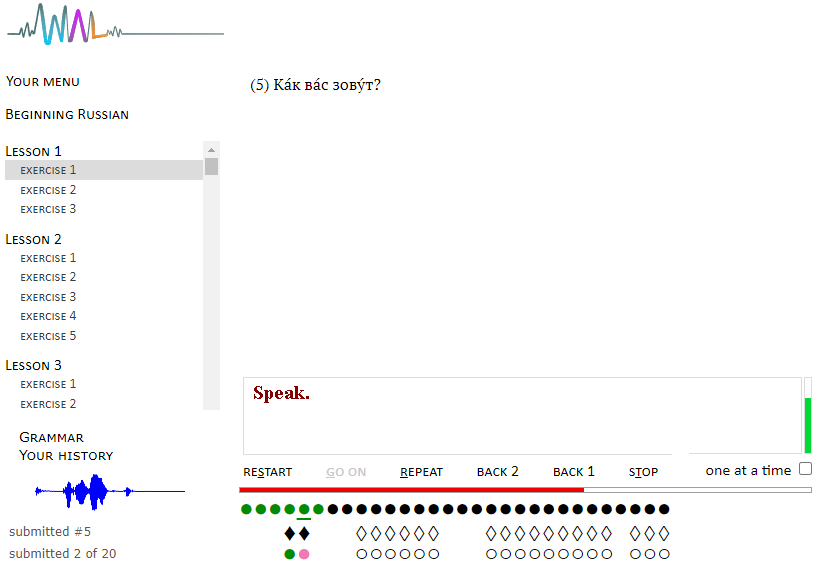
This is how your session will go:
- speak when a red line moves across the window
- the vertical green bar on the right will show your recording level
- the blue waveform below the navigation bar will reflect your most recent recording
- the message below the waveform will give you a status update
- the dots in the bottom row turning green will confirm that your recordings are successfully uploaded
- you can click the dots and the diamonds to see what they do
If anything seems puzzling, read the WAL FAQ.
Long version: [show]
- start one the supported browsers (listed above) and go to https://webaudiolab.org
OR:
go to your Russian 1121 or 1131 Syllabus (https://russian.cornell.edu under Current Classes) and
click the link for "Lesson 1 in Web Audio Lab" (assigned for the second day of classes); if you see a WAL button on an empty white page, click it
- click please register and complete the registration form; use your first name in the nickname box (you will get a Russian nickname later)
- you will receive an email with your password; use it to log in
- if you see You need to sign up for a class, click a button at the bottom, select your section of CU > RUSSA1121 or 1131 in the box
at the bottom, and click Sign up; after that, you may have to log in again
- when you see Where to?, click Beginning Russian
- IMPORTANT: as soon as Beginning Russian is opened, the browser will ask you if you want to allow the web site to use your microphone.
Click Allow. If you ignore this pop-up box or click Block, you will not be able to use the materials until you find the right option in the browser's Settings and change it.
- a red dot or a camcorder/mic icon in the browser's tab will confirm that you are all set to record your voice; if you see a broken icon, click it and correct the situation
After clicking Beginning Russian in the Where to? window, you should see the screen where you will do all your WAL work:
listen to short statements and record your Russian voice--either repeating the phrase you heard or responding to it.
Click Start to begin. At certain points the exercise will pause for one reason or another, and you will be directed to click Go On. You may tap the G key instead.
Speak when you see a red line running across the screen. There is no Record button: recording starts and stops
automatically.
You will see the dots in the bottom row turn pink, then red, then green as your voice is recorded and the recordings
are submitted to the server. When you're done with all pages in Exercise 1, and the last dot has turned green, select the next
exercise from the navigation bar.
You can quickly review any of your recordings by clicking its dot-button in the bottom row.
If your voice seems too quiet, you may need to move the microphone closer to your mouth or else
adjust the microphone recording level in your system control/preferences panel.
If the blue graphic below the navigation bar is flat, you are not recording at all and need to adjust the mic connection
or the choices in your computer's preferences or settings
When you finish your WAL homework, you may, if you wish, click Your history in the navigation bar and
verify that your recordings are on the server. That's how your teacher will review your homework.
If you get stuck, see this FAQ page.
Find out what students in Russian 1121/1122 say about using Web Audio Lab.
Our home page is at russian.cornell.edu.